
🟢Jantaku AR
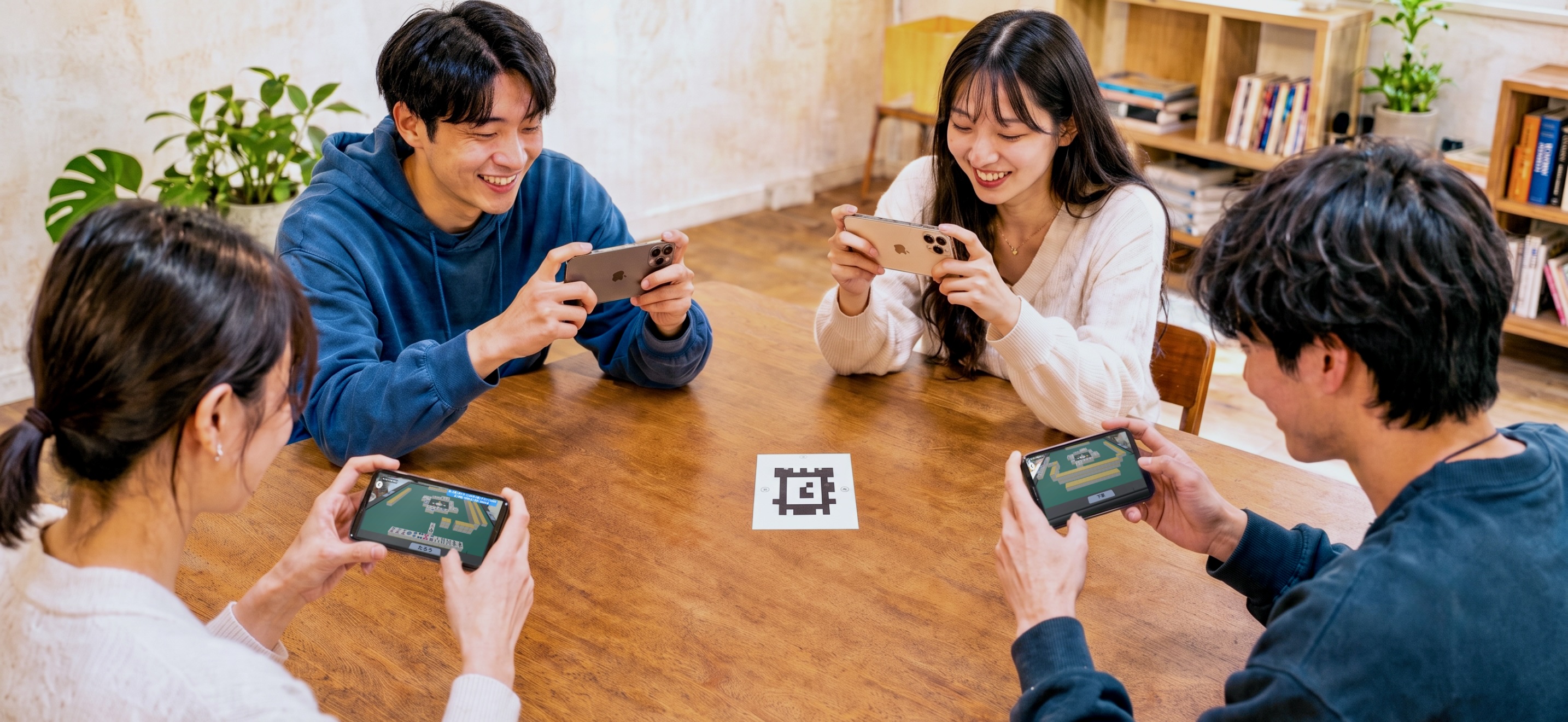
What makes it different from an online mahjong game is that it is built for people who are sitting around the same real table, face to face. You do not need tiles, point sticks or a mahjong table — a table and a phone are enough.
Dealing, scoring, counters and riichi bets are all handled by the app, so a hand never stops because nobody can work out the score.
■ An AR table built for playing face to face
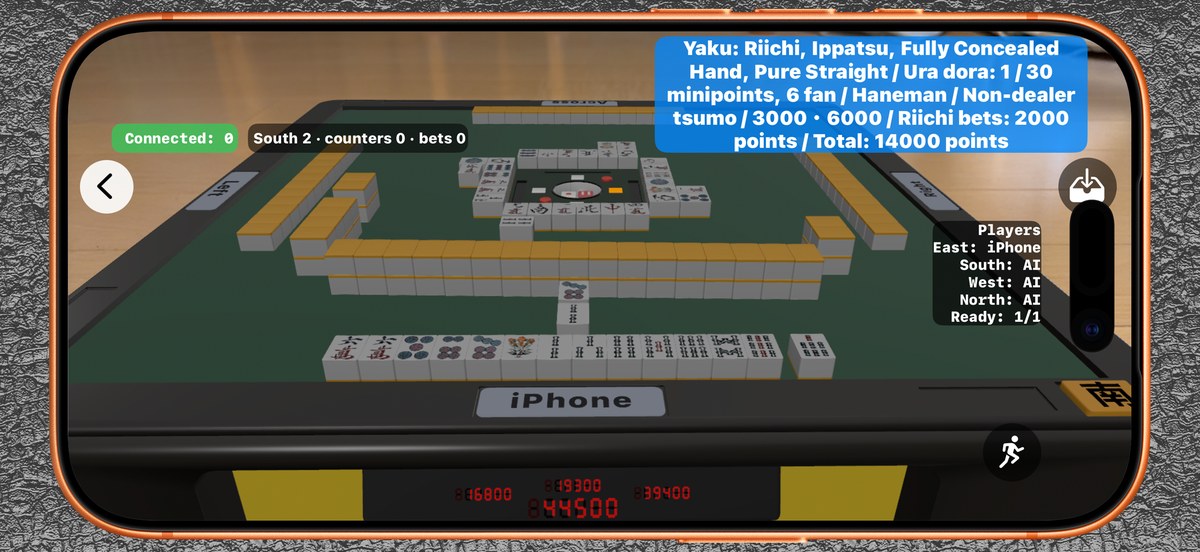
■ One device, or everyone's
Start with Play Solo to practise against the AI on your own. When friends turn up, one person taps Create Room (Host) and the others tap Join Room to share the same table across every device. Any empty seats are filled by the AI.■ Playing solo needs no table and no marker
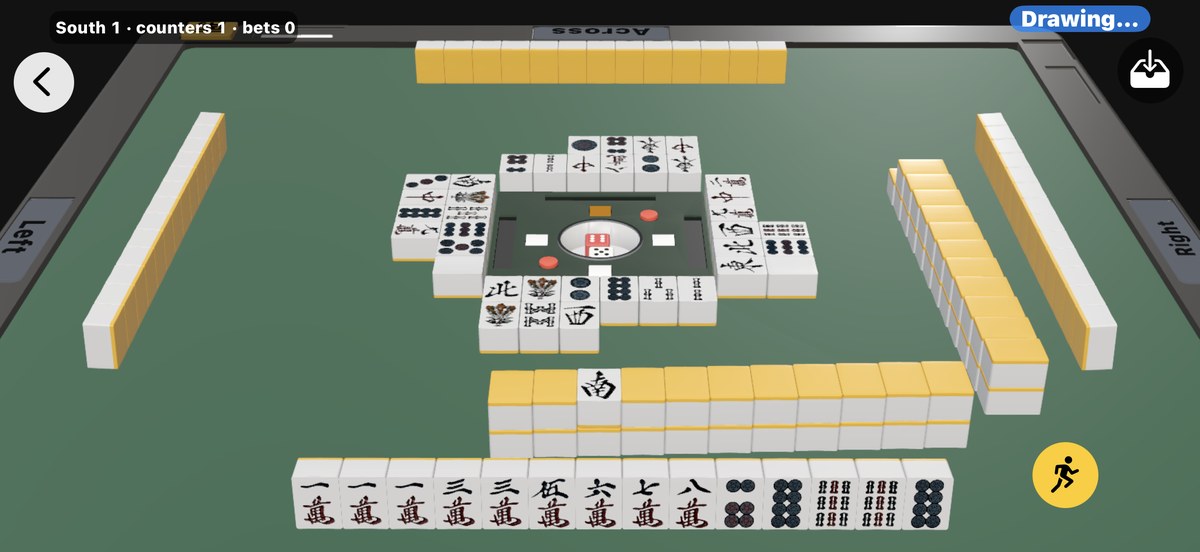
Drag to swing the viewpoint around, pinch to move closer, and tap Reset view to return to the starting angle.
Because the camera and the position tracking are switched off, the phone also runs cooler and uses less battery. It is the more comfortable choice when you want to sit and think.
3D is for solo play only. When several devices share one table, every device has to agree on where the table is, so please use AR (on a table) for that.
■ Ask the Coach when you are stuck
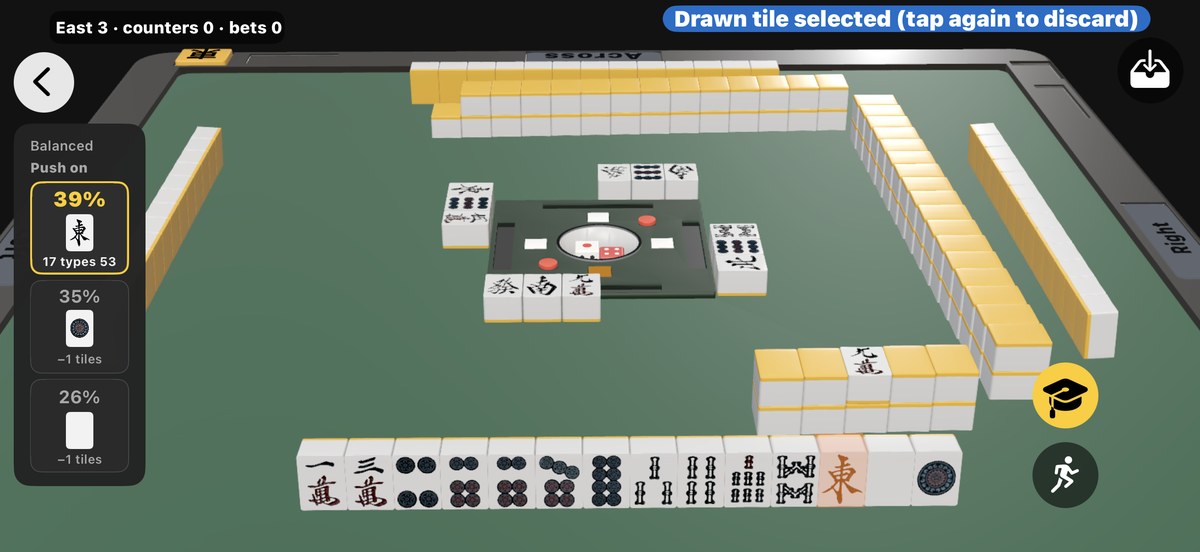
It lays out what a strong player would be looking at: how many tiles and types the hand draws, how far it is from tenpai, whether the tile is already safe, a suji or completely unprotected, and whether you are throwing away a dora or a red five. It also tells you whether the hand is worth pushing, whether to steer around the danger, or whether to bail out.
When you can call a discard it will say whether the call is worth it, and once you are tenpai it will say whether to declare riichi or stay quiet. After a riichi it can play the rest of the hand for you on auto-pilot.
Five playing styles are available — Balanced, Big hand, Closed hand, Defensive and Calling. The same position gets different answers depending on the style you pick. The Coach is not there to hand you the one correct move; it shows you what that style would discard.
The Coach only appears when you open it yourself. Having the answer pop up on every turn would not teach you anything, so it is built to be opened after you have thought it through and got stuck.
The Coach is not a subscription feature — it works the same way during the free trial.
■ The scoring is done for you
Winning hands are recognised automatically: the yaku, the minipoints and fan, and the payments between players. When a hand is won, the yaku and the breakdown of the score are shown, so you pick up scoring as you play. Even on your very first hand, nothing stalls.■ Competition rules, adjustable per table
The default rules follow the ones in common use in competition mahjong today. The number of red fives, open tanyao, how abortive draws are handled and other details can be changed per table from the settings screen.■ Stop in the middle, carry on later
If you have to leave a game part-way through, Resume Saved Game picks it up where you left off, so a full game still fits into short sessions.🟢Getting the marker sheet
Jantaku AR uses a marker sheet to work out where the centre of the table should be. Prepare one from the PDFs below before you play. One sheet per table is enough — every device reads the same one. It can be reused, so you only ever need to make it once.
If you are playing solo with the display set to 3D (screen only), you do not need a marker at all.
If you are playing solo with the display set to 3D (screen only), you do not need a marker at all.
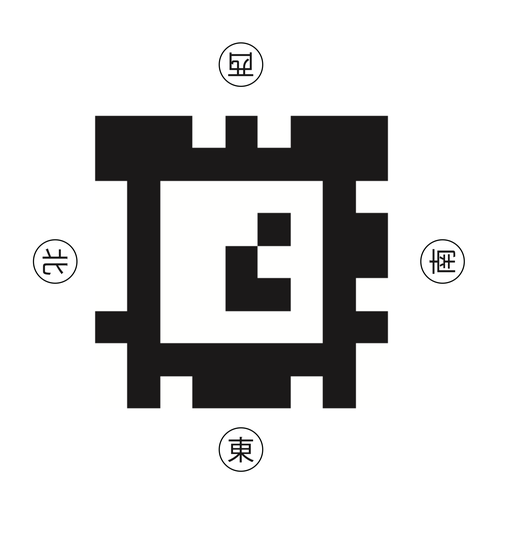
■ Marker sheet for printing (PDF, A4 landscape)
If you have a printer, use this one. It fits on a single A4 sheet.Print it at Actual Size / 100% / no scaling. If you print with "Fit to page" or "Scale to fit", the size changes and the table will not be drawn at the right scale.
Once printed, check with a ruler that each side of the marker measures about 9 cm. If it does, the print is correct.
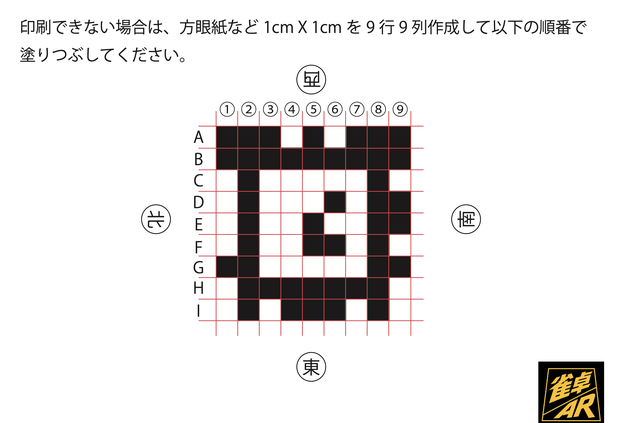
■ Draw it yourself (PDF, if you cannot print)
No printer? You can draw the marker by hand from this chart, which is written in both English and Japanese. Draw a 9 × 9 grid of 1 cm squares on graph paper — 9 cm on each side — and fill in the black squares exactly as shown.Rows are lettered A to I and columns are numbered 1 to 9. A missed or extra square will stop it being recognised, so work through it one square at a time.
■ When you make it
Fill the black in solidly and keep the white areas clean. The marker is read with the camera, so the contrast is what the accuracy depends on.Also keep the white margin around the marker. Cutting right up to the edge of the pattern makes it harder to recognise.
🟢Setting up a game
■ STEP 1 — Put the marker in the middle of the table
Lay the marker sheet you prepared flat in the middle of the table you are sitting around.The four sides of the marker are labelled with the Japanese characters for the winds: 東 East, 南 South, 西 West, 北 North. Whichever character faces you is your seat for that table, and the East side is the dealer's seat.
A curled or folded sheet is harder to read, so keep it as flat as you can.
■ STEP 2 — Point the camera at the marker
Open the app and point the camera at the marker. Hold the device still while it is reading, and a well-lit room helps.■ STEP 3 — Tap where the table should go
Once the marker is recognised, tap the spot you want to use as the centre of the table. The mahjong table is placed there and the game begins.
You can bring these steps back up at any time from the Help button inside the app.
If you are playing solo with 3D (screen only), none of this setup is needed.
If you are playing solo with 3D (screen only), none of this setup is needed.
🟢Pricing
■ Free to try
The app is free to download. Without subscribing you can still start one hand per day, either playing solo or hosting a table.Joining someone else's table is always free. One host subscription covers the whole table, so the other three players never pay anything.
■ Unlimited Solo — monthlyNEW
Play solo against the AI as much as you like. The one-hand-a-day limit is gone.Set the display to 3D (screen only) and you need no table and no marker, so you can start a hand on the train or before you go to sleep.
Pick a style in the Coach — Balanced, Big hand, Closed hand, Defensive or Calling — and it will tell you which tile to discard, and why, on every turn you ask. It is the combination to practise on your own.
This plan cannot host 4-player tables. If you want to host, choose 1 Table below.
■ 1 Table — monthly
Host a table and play with four people. One subscription covers one table of up to four players, and everyone else joins free.It includes everything in Unlimited Solo, so there is no limit on solo play either.
■ About the plans
Choose one plan — you can switch plans at any time. Note that if you move from 1 Table down to Unlimited Solo, you will no longer be able to host 4-player tables.Payment is handled as an App Store subscription and renews monthly until cancelled. The price shown in the App Store is the one that applies in your region. Cancel or change plan at any time from the Settings app on your iPhone.
The Coach and the automatic scoring are free for everyone, subscribed or not. What a subscription buys is how many hands you can play, and whether you can host a table.
🟢Requirements
■ Devices
iPhone running iOS 18.6 or later.iOS 26 or later is recommended. A newer version will give you a smoother experience.
■ Other
Please allow access to the camera (it is used for the AR display; playing solo in 3D (screen only) does not use the camera).To play across several devices, everyone must be on the same Wi-Fi network — a personal hotspot or a portable Wi-Fi router counts — and each device must allow local network access.
Portable and public Wi-Fi networks often have a restriction called AP isolation, or client isolation, which stops devices on the network from reaching each other. Please check that the devices can find each other before you subscribe.
Some portable Wi-Fi routers let you turn that isolation off in their settings, so it is worth checking there.
🟢Support
If something is not working, or you have a question or a request, please email us. We read every message and reply in English or Japanese.
Email: support@jbeans.jp
It helps if you can tell us your iPhone model, your iOS version, and whether you were playing solo or across several devices.
Email: support@jbeans.jp
It helps if you can tell us your iPhone model, your iOS version, and whether you were playing solo or across several devices.